How to make AI sentient in Unity, Part I
In the IsInVisibleArea method, we have the same test as in the Ears component to find out, whether a detectable is in the visible distance and we also test if the detectable is inside the field of view. For now, just note that on Ears it's set to true and on Eyes, it's set to false. Equals(detectable.
Today, I'd like to show you one way to grant sentience to your AI agent in Unity so it can T-800 the world...
Ok, not really. However, I'm going to guide you through an implementation of eyes and ears you can use for your NPCs, so they will be able to react when they see or hear a specific object in a scene, which is also pretty cool, right? :-)
In this Part I, we're going to see the base class Sense, and Eyes and Ears that inherit from it. We're also going to see how to take advantage of UnityAction to keep the implementations of senses and reactions nicely decoupled.
In the subsequent and final Part II, we're going to dive into the implementation of some actual reactive AI behavior and find out how to harness the power of a simple State pattern, which is enough if we don't plan any complex AI.
If you do plan to have a game with complex AI behavior, look for behavior trees, Goal Oriented Action Planning (GOAP), or Hierarchical Task Network (HTN).
I assume you have at least a basic understanding of Unity engine and C# programming language, though I tried to make this tutorial reasonably beginner-friendly. Feedback is always welcomed.
Before we'll continue, I encourage you to get the final example from GitHub and open it in Unity 2020.3.17f1, so you can see the parts of code I'll be describing in the context.
So if you're ready, without further ado, let's get started 🚀.
Detectable and PlayerController components
First, we don't want our AI to uncontrollably react on every GameObject in the scene, so we need to mark only the Player as detectable.
It can be achieved with Tags, for instance, but marking objects by adding a custom component gives us a possibility to store and pass some useful data.
In this example, it's the flag CanBeHear that is set by PlayerController only when a player is moving and unset when the player stays still. You can see in the hierarchy that both Detectable and PlayerController are attached to the Player object.
public class Detectable : MonoBehaviour
{
    public bool CanBeHear;
}As for the PlayerController, I'm not going to describe its implementation in much detail, it's very basic and not what we're focusing on in this post.
But notice how we set detectable.CanBeHear to true only if the verticalAxis is bigger than zero, in other words, only when the player is moving.
This player controller depends on the Detectable component, so it's a good practice to decorate the class with the RequireComponent attribute, just as you can see on the first line below.
[RequireComponent(typeof(Detectable))]
public class PlayerController : MonoBehaviour
{
public float MoveSpeed = 6f;
public float RotationSpeed = 100f;
<span class="hljs-keyword">private</span> Detectable detectable;
<span class="hljs-function"><span class="hljs-keyword">private</span> <span class="hljs-keyword">void</span> <span class="hljs-title">Start</span>()</span>
{
detectable = GetComponent<Detectable>();
}
<span class="hljs-function"><span class="hljs-keyword">private</span> <span class="hljs-keyword">void</span> <span class="hljs-title">Update</span>()</span>
{
<span class="hljs-built_in">float</span> verticalAxis = Input.GetAxis(<span class="hljs-string">"Vertical"</span>);
<span class="hljs-built_in">float</span> horizontalAxis = Input.GetAxis(<span class="hljs-string">"Horizontal"</span>);
detectable.CanBeHear = verticalAxis > <span class="hljs-number">0f</span>;
transform.Translate(Vector3.forward * verticalAxis * MoveSpeed * Time.deltaTime, Space.Self);
transform.Rotate(Vector3.up * horizontalAxis * RotationSpeed * Time.deltaTime);
}
}
The base class Senses
Before we'll be talking about Eyes and Ears, let's point out that although they need to have a slightly different implementation, they both can share a fair bit of common logic.
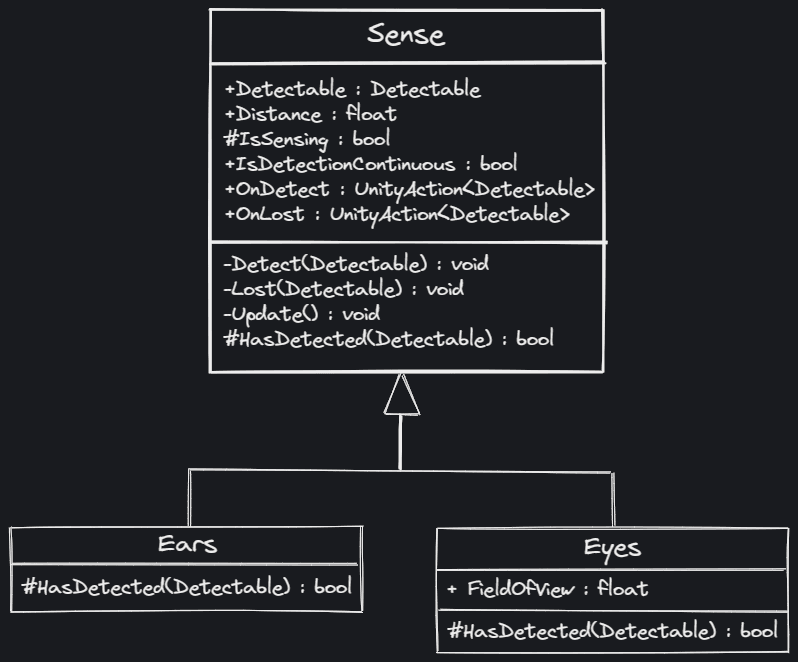 UML class diagram shows member variables and methods of classes and relations among them.
That's a good place for using inheritance. You might have heard that you should always favor composition over inheritance and that some modern languages like Go don't even have the inheritance.
But the short-sighted conclusion "inheritance is bad" is just wrong. Inheritance represents is a relationship like a cat is an animal, or in our case, eyes and ears are senses, while composition represents has a relationship, like a car has an engine, or in Unity, a GameObject can have MeshRenderer, Rigidbody, Collider, and many other components.
In fact, in relationship with GameObject, our Eyes and Ears are also components and Sense is a MonoBehavior, which makes Eyes and Ears MonoBehaviors as well.
Both inheritance and composition are useful concepts of OOP and both are often used together. When used right they are very powerful when misused they both can lead to an unmanageable mess. But let's get back to the original topic.
In the Sense class code below, notice how we have no logic in the protected virtual HasDetected method. Because we won't be attaching to any GameObject the base class itself, but its child classes Eyes and Ears which overwrites this method with their own logic as we'll soon see.
The usefulness of the IsDetectionContinuous flag we'll see in Part II in context with behavior. For now, just note that on Ears it's set to true and on Eyes, it's set to false. Ears and Eyes with respective components are in the scene hierarchy child objects of the Enemy.
using UnityEngine;
using UnityEngine.Events;
public class Sense : MonoBehaviour
{
public Detectable Detectable;
public float Distance;
<span class="hljs-keyword">protected</span> <span class="hljs-built_in">bool</span> IsSensing;
<span class="hljs-keyword">public</span> <span class="hljs-built_in">bool</span> IsDetectionContinuous = <span class="hljs-literal">true</span>;
<span class="hljs-keyword">public</span> UnityAction<Detectable> OnDetect;
<span class="hljs-keyword">public</span> UnityAction<Detectable> OnLost;
<span class="hljs-function"><span class="hljs-keyword">private</span> <span class="hljs-keyword">void</span> <span class="hljs-title">Detect</span>(<span class="hljs-params">Detectable detectable</span>)</span>
{
IsSensing = <span class="hljs-literal">true</span>;
OnDetect?.Invoke(detectable);
}
<span class="hljs-function"><span class="hljs-keyword">private</span> <span class="hljs-keyword">void</span> <span class="hljs-title">Lost</span>(<span class="hljs-params">Detectable detectable</span>)</span>
{
IsSensing = <span class="hljs-literal">false</span>;
OnLost?.Invoke(detectable);
}
<span class="hljs-function"><span class="hljs-keyword">void</span> <span class="hljs-title">Update</span>()</span>
{
<span class="hljs-keyword">if</span> (IsSensing)
{
<span class="hljs-keyword">if</span> (!HasDetected(Detectable))
{
Lost(Detectable);
<span class="hljs-keyword">return</span>;
}
<span class="hljs-keyword">if</span>(IsDetectionContinuous)
{
Detect(Detectable);
}
}
<span class="hljs-keyword">else</span>
{
<span class="hljs-keyword">if</span> (!HasDetected(Detectable))
<span class="hljs-keyword">return</span>;
Detect(Detectable);
}
}
<span class="hljs-function"><span class="hljs-keyword">protected</span> <span class="hljs-keyword">virtual</span> <span class="hljs-built_in">bool</span> <span class="hljs-title">HasDetected</span>(<span class="hljs-params">Detectable detectable</span>)</span> => <span class="hljs-literal">false</span>;
}
The Ears component
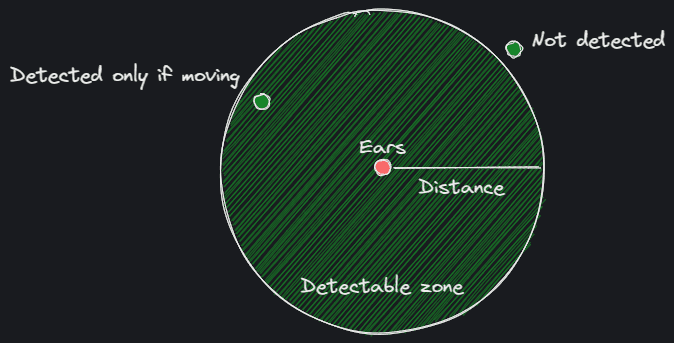 Games are a lot about simplification and this is how ears can work in a simplified game world.
With Sense as a base class, the Ears class derived from it is actually pretty simple, all it needs is to provide overwrite for HasDetected method where true is returned when detectable is within the Distance and its flag CanBeHear is set.
public class Ears : Sense

{

protected override bool HasDetected(Detectable detectable)

{

return Vector3.Distance(detectable.transform.position, transform.position) <= Distance && detectable.CanBeHear;

}

}
The Eyes component
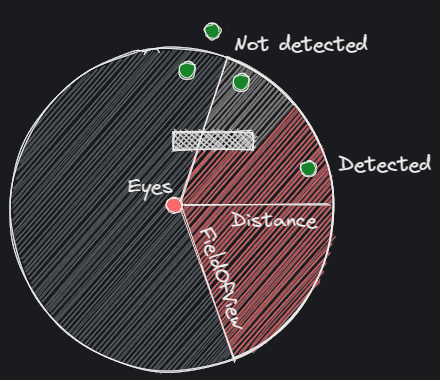 The idea behind the Eyes component is also very simple. Apart from Distance we just need FOV and also test if detectable is occluded.
As you probably already guess, the implementation of the Eyes class is not a one-liner. However, it's still quite simple. The detectable zone just needs to be determined not only by distance but also by field of view.
When a detectable object is inside the zone, the Eyes component needs to perform just one extra test to find out whether the object is occluded or not.
using UnityEngine;
public class Eyes : Sense
{
[Range(0,180)]
public float FieldOfView;
<span class="hljs-keyword">private</span> <span class="hljs-built_in">float</span> FieldOfViewDot;
<span class="hljs-function"><span class="hljs-keyword">void</span> <span class="hljs-title">Start</span>()</span>
{
FieldOfViewDot = <span class="hljs-number">1</span> - Remap(FieldOfView * <span class="hljs-number">0.5f</span>, <span class="hljs-number">0</span>, <span class="hljs-number">90</span>, <span class="hljs-number">0</span>, <span class="hljs-number">1f</span>);
}
<span class="hljs-function"><span class="hljs-keyword">private</span> <span class="hljs-built_in">float</span> <span class="hljs-title">Remap</span>(<span class="hljs-params"><span class="hljs-built_in">float</span> <span class="hljs-keyword">value</span>, <span class="hljs-built_in">float</span> originalStart, <span class="hljs-built_in">float</span> originalEnd, <span class="hljs-built_in">float</span> targetStart, <span class="hljs-built_in">float</span> targetEnd</span>)</span>
{
<span class="hljs-keyword">return</span> targetStart + (<span class="hljs-keyword">value</span> - originalStart) * (targetEnd - targetStart) / (originalEnd - originalStart);
}
<span class="hljs-function"><span class="hljs-keyword">protected</span> <span class="hljs-keyword">override</span> <span class="hljs-built_in">bool</span> <span class="hljs-title">HasDetected</span>(<span class="hljs-params">Detectable detectable</span>)</span>
{
<span class="hljs-keyword">return</span> IsInVisibleArea(detectable) && IsNotOccluded(detectable);
}
<span class="hljs-function"><span class="hljs-keyword">private</span> <span class="hljs-built_in">bool</span> <span class="hljs-title">IsInVisibleArea</span>(<span class="hljs-params">Detectable detectable</span>)</span>
{
<span class="hljs-built_in">float</span> distance = Vector3.Distance(detectable.transform.position,
<span class="hljs-keyword">return</span> distance <= Distance && Vector3.Dot(Direction(detectable.transform.position, <span class="hljs-keyword">this</span>.transform.position), <span class="hljs-keyword">this</span>.transform.forward) >= FieldOfViewDot;
}
<span class="hljs-function"><span class="hljs-keyword">private</span> Vector3 <span class="hljs-title">Direction</span>(<span class="hljs-params">Vector3 <span class="hljs-keyword">from</span>, Vector3 to</span>)</span>
{
<span class="hljs-keyword">return</span> (<span class="hljs-keyword">from</span> - to).normalized;
}
<span class="hljs-function"><span class="hljs-keyword">private</span> <span class="hljs-built_in">bool</span> <span class="hljs-title">IsNotOccluded</span>(<span class="hljs-params">Detectable detectable</span>)</span>
{
<span class="hljs-keyword">if</span> (Physics.Raycast(transform.position, detectable.transform.position - transform.position, <span class="hljs-keyword">out</span> RaycastHit hit, Distance))
{
<span class="hljs-keyword">return</span> hit.collider.gameObject.Equals(detectable.gameObject);
}
<span class="hljs-keyword">return</span> <span class="hljs-literal">false</span>;
}
}
As you can see, HasDetected method is still a one-liner, but both IsInVisibleArea and IsNotOcclued methods need to be implemented by us.
In the IsInVisibleArea method, we have the same test as in the Ears component to find out, whether a detectable is in the visible distance and we also test if the detectable is inside the field of view.
To figure it out, we need direction between detectable and eyes, which we get simply by vector subtraction. Then we calculate the dot product between normalized direction and forward vector of Eyes (which is also a unit vector).
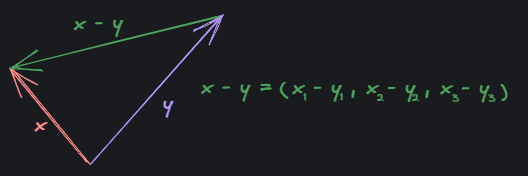 Finding direction between two points using vector subtraction.
Finally, we compare the dot product with FieldOfViewDot, which we set in the Start method as one minus half of the FieldOfView remapped from the original range to a range from 0 to 1. If it's bigger or equal, detectable is inside the field of view.
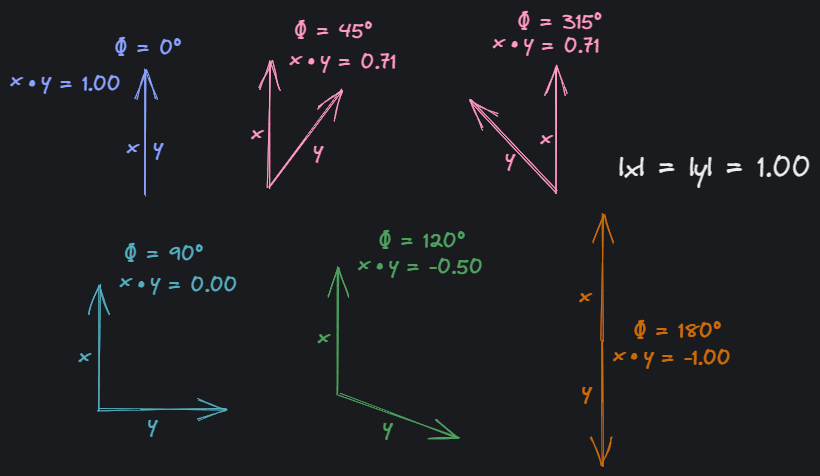 Dot products of various unit vectors (vectors of length 1). It goes from 1 to -1 as the angle changes from 0 to 180 degrees, then it goes back from -1 to 1 between 180 and 360 degree, which makes sense, since you can think about dot product as "how much one vector projects to another".
The dot product is particularly useful in this case. Since we don't need to care whether the detectable is on the left or on the right side, there's no need to calculate the actual angle between two vectors.
Of course, we can set FieldOfView directly in the range between 0 to 1, get rid of FieldOfViewDot and cut out the value remapping, but it's much more intuitive to think about FOV in terms of angles.
Exposing values in human-friendly units while internally using different ones for better performance is a common practice often see also with angles and radians.
Unity have us covered here, once again with Vector3.Distance, and also with Vector3.Dot methods. There's also Vector3.Angle method for cases when dot product is not enough. That's nice, even though the math behind it is relatively basic. I'm including it here, as a little bonus:
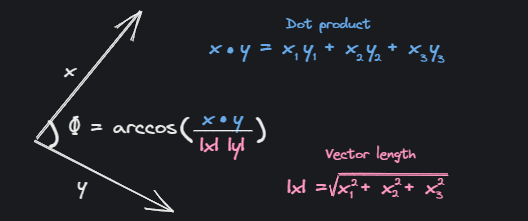 The cosine of the angle between two vectors can be found by dividing their dot product by product of their magnitudes. To get the angle we use arccos, the inverse function of cosine.
As mentioned before, in the last test Eyes component check if detectable is occluded. This is implemented in the IsNotOccluded method with Unity's Physics.Raycast.
X-Ray vision, invisibility, glass, more detectable objects, etc.
Before we wrap up Part I, let's briefly talk about some edge-cases, limitations, and extra features.
To tackle invisibility, you can add another member next to CanBeHear in the Detectable component and in the the Eyes component perform a similar check as you've seen in Ears component.
For X-Ray vision, the simplest approach would be to add a Boolean variable to the Eyes component, something like HasXRay, and skip IsNotOccluded method call when the flag is set.
If you have transparent objects in your scene, like glass doors or windows, you can simply add them to Ignore Raycast layer.
 Objects in the Ignore Raycast layer are ignored by Physics Raycast by default.
Having more than one detectable object would be a bit tricky, but one reasonable approach would be, instead of adding complexity to senses, creating another layer that would provide detectable from a pool of detectables on runtime. This way, there will be still only one detectable associated with a set of senses at a time and implementation of senses would stay intact.
That's it for today. I hope you've enjoyed it. If so, stay tuned for Part II, where we're going to dissect the implementation of an AI controller and behaviors like patrol between points, chase player, and investigate location.


