Using Inverse Kinematics for hand placement.
This function sets the position of the ultimate goal in world space; the actual point in space where the body part ends up is also influenced by a weight parameter that specifies how far between the start and the goal the IK should aim (a value in the range 0. The AvatarIKGoal that we want to set. 0. 0.
One of the hardest things to get correct in a game is the placement of a character's hands. In this article, I will use Inverse Kinematics (IK) to give that extra polish to my game when ledge grabbing. This concept can be used to add that extra polish to any animation that requires the correct placement of hands or feet.
Enabling IK on the Animator.
The first step is to enable an IK Pass on a layer in the Animator.
- Open the Animator and Edit the Animator Controller for your character.
- In the Layers tab click the Settings cog for the Layer that has the Animation that you want to use IK.
- Check the IK Pass checkbox.
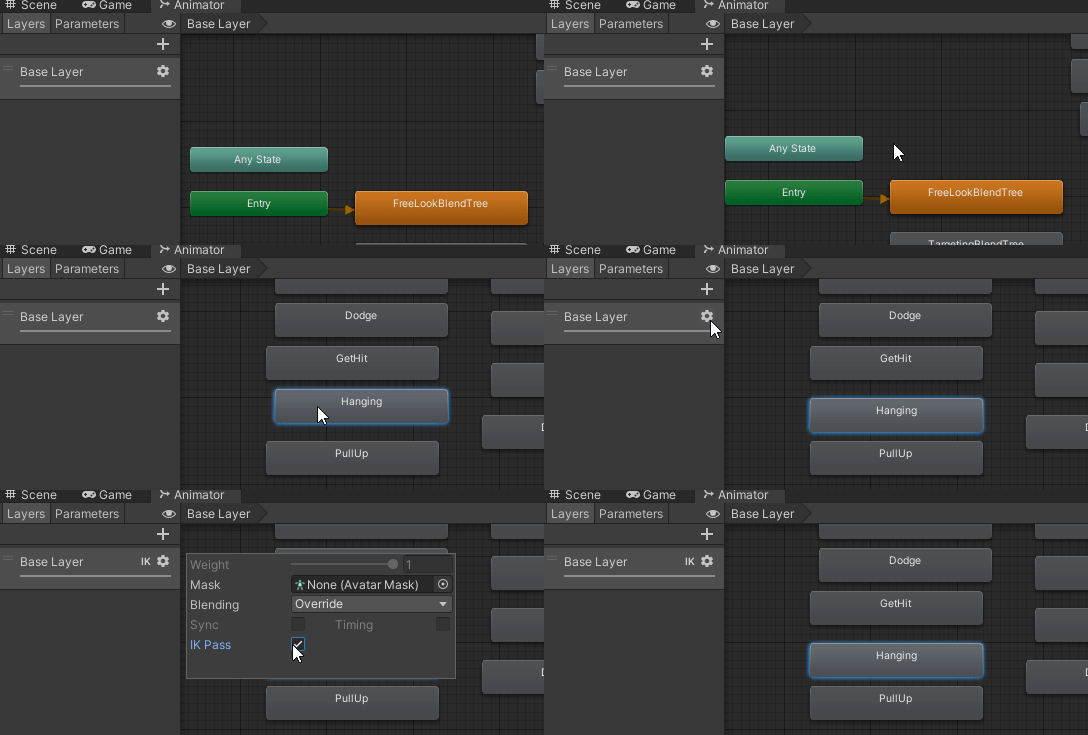 Enabling IK on the Animator
The Code
Now that we have made sure that our character will be able to use IK, it is time to write some code. There are a couple of different places where Unity provides us the ability to use IK.
- Monobehaviour.OnAnimatorIK(int)
- StateMachineBehavior.OnStateExit(Animator animator, AnimatorStateInfo animatorStateInfo, int layerIndex)
There are 2 methods on the Animator that we will need to use IK.
- Animator.SetIKPositionWeight- "Sets the weight of an IK goal" (LeftFoot, RightFoot, LeftHand, RightHand) (0 = at the original animation before IK, 1 = at the goal).
- Animator.SetIKPosition- "Sets the position of an IK goal."
I already have a MonoBehaviour that uses the OnTriggerEnter(Collider other) callback that triggers an event to notify my character controller that it should be ledge-grabbing.
These scripts come from the Unity 3rd Person Combat & Traversal course on Game Dev TV.
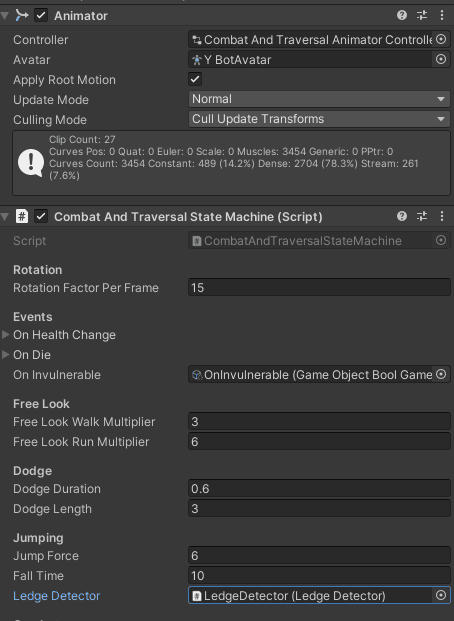
State Machine script despite its name is actually a MonoBehaviour and should not be confused with the Unity StateMachineBehavior.
namespace LegendOfTheHero.StateMachines
{
public class CombatAndTraversalStateMachine :
StateMachine<CombatAndTraversalBaseState, CombatAndTraversalStateFactory, CombatAndTraversalStateMachine>
{
[field: SerializeField] public LedgeDetector LedgeDetector { get; private set; }
<span class="hljs-meta">#<span class="hljs-keyword">region</span> Unity Methods</span>
<span class="hljs-meta">#<span class="hljs-keyword">region</span> Init</span>
<span class="hljs-function"><span class="hljs-keyword">protected</span> <span class="hljs-keyword">override</span> <span class="hljs-keyword">void</span> <span class="hljs-title">OnEnable</span>()</span>
{
<span class="hljs-keyword">if</span> (LedgeDetector) LedgeDetector.OnLedgeDetect += LedgeDetectorOnOnLedgeDetect;
}
<span class="hljs-function"><span class="hljs-keyword">protected</span> <span class="hljs-keyword">override</span> <span class="hljs-keyword">void</span> <span class="hljs-title">OnDisable</span>()</span>
{
<span class="hljs-keyword">base</span>.OnDisable();
<span class="hljs-keyword">if</span> (LedgeDetector) LedgeDetector.OnLedgeDetect -= LedgeDetectorOnOnLedgeDetect;
}
<span class="hljs-meta">#<span class="hljs-keyword">endregion</span></span>
<span class="hljs-meta">#<span class="hljs-keyword">endregion</span></span>
<span class="hljs-function"><span class="hljs-keyword">private</span> <span class="hljs-keyword">void</span> <span class="hljs-title">LedgeDetectorOnOnLedgeDetect</span>(<span class="hljs-params">Vector3 ledgeForward, Vector3 closestPoint</span>)</span>
{
((CombatHangingState)Factory.Hanging).SetPositions(ledgeForward, closestPoint);
}
}</div></code><button aria-label="Copy code" aria-pressed="false" class="flex justify-center group items-center outline-hidden bg-turquoise shadow-button-secondary fill-shadow-grey hover:bg-fresh-green hover:shadow-button-secondary-hover active:bg-dark-teal active:shadow-button-secondary-active active:fill-ivory transition-all cursor-pointer disabled:cursor-auto select-none absolute right-4 top-4 h-10 w-10"><svg xmlns="http://www.w3.org/2000/svg" height="20px" width="20px" viewBox="0 -960 960 960" fill="inherit" class="group-aria-pressed:hidden"><path d="M360-240q-33 0-56.5-23.5T280-320v-480q0-33 23.5-56.5T360-880h360q33 0 56.5 23.5T800-800v480q0 33-23.5 56.5T720-240H360Zm0-80h360v-480H360v480ZM200-80q-33 0-56.5-23.5T120-160v-520q0-17 11.5-28.5T160-720q17 0 28.5 11.5T200-680v520h400q17 0 28.5 11.5T640-120q0 17-11.5 28.5T600-80H200Zm160-240v-480 480Z"></path></svg><svg xmlns="http://www.w3.org/2000/svg" height="20px" width="20px" viewBox="0 -960 960 960" fill="inherit" class="hidden group-aria-pressed:block"><path d="m382-354 339-339q12-12 28-12t28 12q12 12 12 28.5T777-636L410-268q-12 12-28 12t-28-12L182-440q-12-12-11.5-28.5T183-497q12-12 28.5-12t28.5 12l142 143Z"></path></svg></button></pre>MonoBehavior that is on the same level as the Animator<img src="https://strapi.gamedev.tv/uploads/Unity_z_VOFI_79_Kml_4826f5da7a.png" alt="" width="799" height="294" onload="(()=>{if(this.attributes.height!==null&&this.attributes.height>0){return}window.dispatchEvent(new Event('resize'))})();"><pre class="flex flex-row w-full items-start justify-between !p-5 relative break-words whitespace-break-spaces"><code class="hljs language-csharp flex flex-col w-full !pr-11 break-word"><div style="white-space: inherit;"><span class="hljs-keyword">namespace</span> <span class="hljs-title">LegendOfTheHero.Ledges</span>
{
[RequireComponent(typeof(Collider), typeof(Rigidbody))]
public class LedgeDetector : MonoBehaviour
{
public event Action<Vector3, Vector3> OnLedgeDetect;
<span class="hljs-function"><span class="hljs-keyword">private</span> <span class="hljs-keyword">void</span> <span class="hljs-title">OnTriggerEnter</span>(<span class="hljs-params">Collider other</span>)</span>
{
OnLedgeDetect?.Invoke(other.transform.forward, other.ClosestPointOnBounds(transform.position));
}
}
}
Adding the OnAnimatorIK Unity callback.
Since the code that is controlling my character is so long I will be putting all of the logic for the IK in my Ledge Detection script. I will add a method called OnLedgeAnimatorIK and call that from within my character-controlling script OnAnimatorIK Unity callback.
namespace LegendOfTheHero.StateMachines

{

public class CombatAndTraversalStateMachine :

StateMachine<CombatAndTraversalBaseState, CombatAndTraversalStateFactory, CombatAndTraversalStateMachine>

{

#region Unity Methods
    <span class="hljs-meta">#<span class="hljs-keyword">region</span> Init /*...*/ #<span class="hljs-keyword">endregion</span></span>

    <span class="hljs-meta">#<span class="hljs-keyword">endregion</span></span>

    <span class="hljs-function"><span class="hljs-keyword">private</span> <span class="hljs-keyword">void</span> <span class="hljs-title">OnAnimatorIK</span>(<span class="hljs-params"><span class="hljs-built_in">int</span> layerIndex</span>)</span>
    {
        <span class="hljs-keyword">if</span> (LedgeDetector) LedgeDetector.OnLedgeAnimatorIK(Animator);
    }

    <span class="hljs-function"><span class="hljs-keyword">private</span> <span class="hljs-keyword">void</span> <span class="hljs-title">LedgeDetectorOnOnLedgeDetect</span>(<span class="hljs-params">Vector3 ledgeForward, Vector3 closestPoint</span>)</span> { <span class="hljs-comment">/*...*/</span> }
}

}
namespace LegendOfTheHero.Ledges

{

[RequireComponent(typeof(Collider), typeof(Rigidbody))]

public class LedgeDetector : MonoBehaviour

{

public event Action<Vector3, Vector3> OnLedgeDetect;
    <span class="hljs-function"><span class="hljs-keyword">private</span> <span class="hljs-keyword">void</span> <span class="hljs-title">OnTriggerEnter</span>(<span class="hljs-params">Collider other</span>)</span>
    {
        OnLedgeDetect?.Invoke(other.transform.forward, other.ClosestPointOnBounds(transform.position));
    }

    <span class="hljs-function"><span class="hljs-keyword">public</span> <span class="hljs-keyword">void</span> <span class="hljs-title">OnLedgeAnimatorIK</span>(<span class="hljs-params">[NotNull] Animator animator</span>)</span>
    {

    }
}

}
Setting IK weights and Positions
To set the weight we use public void SetIKPositionWeight(AvatarIKGoalgoal, float value);
This function sets a weight value in the range 0..1 to determine how far between the start and goal positions the IK will aim. The position itself is set separately using SetIKPosition.
To set the position we use public void SetIKPosition(AvatarIKGoalgoal, Vector3goalPosition);
An IK goal is a target position and rotation for a specific body part. Unity can calculate how to move the part toward the target from the starting point (ie, the current position and rotation obtained from the animation).
This function sets the position of the ultimate goal in world space; the actual point in space where the body part ends up is also influenced by a weight parameter that specifies how far between the start and the goal the IK should aim (a value in the range 0..
To set the weight and position we need to know 3 things.
- The position to use. ( We will use the position of a Transform object)
- The Weight of to use. (OnAnimatorIK will run on all animations in a Layer with IK Pass set to true. We will set this to 1 when we are hanging and 0 when we are not.)
- The AvatarIKGoal that we want to set. (We will be setting both hands)
namespace LegendOfTheHero.Ledges
{
[RequireComponent(typeof(Collider), typeof(Rigidbody))]
public class LedgeDetector : MonoBehaviour
{
[SerializeField] private Transform leftHandPosition;
[SerializeField] private Transform rightHandPosition;
<span class="hljs-keyword">private</span> <span class="hljs-built_in">bool</span> _hasLeftHandPosition;
<span class="hljs-keyword">private</span> <span class="hljs-built_in">bool</span> _hasRightHandPosition;
<span class="hljs-keyword">private</span> <span class="hljs-built_in">bool</span> _useIK;
<span class="hljs-comment"><span class="hljs-doctag">///</span> <span class="hljs-doctag"><summary></span></span>
<span class="hljs-comment"><span class="hljs-doctag">///</span> Use to set whether or not we are in a state that needs the IK.</span>
<span class="hljs-comment">// If you are not useing the scripts from the Game Dev TV you can set this in OnTriggerEnter and OnTriggerExit.</span>
<span class="hljs-comment"><span class="hljs-doctag">///</span> Originally used OnTrigger Enter and Exit to set this, but due to</span>
<span class="hljs-comment"><span class="hljs-doctag">///</span> the character moving it's position OnTriggerExit was triggered to early. </span>
<span class="hljs-comment"><span class="hljs-doctag">///</span> <span class="hljs-doctag"></summary></span></span>
<span class="hljs-keyword">public</span> <span class="hljs-built_in">bool</span> UseIK
{
<span class="hljs-keyword">set</span> => _useIK = <span class="hljs-keyword">value</span>;
}
<span class="hljs-keyword">public</span> <span class="hljs-keyword">event</span> Action<Vector3, Vector3> OnLedgeDetect;
<span class="hljs-function"><span class="hljs-keyword">private</span> <span class="hljs-keyword">void</span> <span class="hljs-title">Awake</span>()</span>
{
_hasRightHandPosition = rightHandPosition;
_hasLeftHandPosition = leftHandPosition;
}
<span class="hljs-comment">/*...*/</span>
}
}
We also need to make sure that the use IK gets set to true when we start hanging and false when we stop hanging.
namespace LegendOfTheHero.StateMachines

{

public class CombatHangingState: CombatAndTraversalBaseState

{

/.../
    <span class="hljs-meta">#<span class="hljs-keyword">region</span> State Implementation</span>

    <span class="hljs-function"><span class="hljs-keyword">public</span> <span class="hljs-keyword">override</span> <span class="hljs-keyword">void</span> <span class="hljs-title">EnterState</span>()</span>
    {
        <span class="hljs-comment">/*...*/</span>

        context.EnableController = <span class="hljs-literal">false</span>;
        Transform transform;
        (transform = context.transform).rotation = Quaternion.LookRotation(_ledgeForward, Vector3.up);
        transform.position =
            _closestPoint - (context.LedgeDetector.transform.position - transform.position);
        context.EnableController = <span class="hljs-literal">true</span>;

        context.Animator.CrossFadeInFixedTime(HangHash, AnimationDampTime);
        context.AppliedMovement = Vector3.zero;

        <span class="hljs-comment">// Make sure we let the Ledge Detector know to us IK</span>
        context.LedgeDetector.UseIK = <span class="hljs-literal">true</span>;
    }

    <span class="hljs-comment">/*...*/</span>

    <span class="hljs-function"><span class="hljs-keyword">protected</span> <span class="hljs-keyword">override</span> <span class="hljs-keyword">void</span> <span class="hljs-title">ExitState</span>()</span>
    {
        <span class="hljs-comment">// Make sure we let the Ledge Detector know to us IK</span>
        context.LedgeDetector.UseIK = <span class="hljs-literal">false</span>;
        <span class="hljs-comment">/*...*/</span>
    }

    <span class="hljs-function"><span class="hljs-keyword">protected</span> <span class="hljs-keyword">override</span> <span class="hljs-keyword">void</span> <span class="hljs-title">InitializeSubState</span>()</span> {}

    <span class="hljs-meta">#<span class="hljs-keyword">endregion</span></span>

    <span class="hljs-comment">/*...*/</span>

    <span class="hljs-function"><span class="hljs-keyword">public</span> <span class="hljs-keyword">void</span> <span class="hljs-title">SetPositions</span>(<span class="hljs-params">Vector3 ledgeForward, Vector3 closestPoint</span>)</span>
    {
        _ledgeForward = ledgeForward;
        _closestPoint = closestPoint;
    }
}

}
Back in Ledge Detector let's set the IK weights and position.
namespace LegendOfTheHero.Ledges

{

[RequireComponent(typeof(Collider), typeof(Rigidbody))]

public class LedgeDetector : MonoBehaviour

{

/.../
    <span class="hljs-function"><span class="hljs-keyword">public</span> <span class="hljs-keyword">void</span> <span class="hljs-title">OnLedgeAnimatorIK</span>(<span class="hljs-params">[NotNull] Animator animator</span>)</span>
    {
        <span class="hljs-comment">// Set the weight to 1 if we are using ik else set it to 0 </span>
        <span class="hljs-built_in">float</span> weight = _useIK ? <span class="hljs-number">1</span> : <span class="hljs-number">0</span>;
        <span class="hljs-comment">// Set the Left Hand Weight if we have a position for it</span>
        animator.SetIKPositionWeight(AvatarIKGoal.LeftHand, _hasLeftHandPosition ? weight : <span class="hljs-number">0</span>);
        <span class="hljs-comment">// Set the Right Hand Weight if we have a position for it</span>
        animator.SetIKPositionWeight(AvatarIKGoal.RightHand, _hasRightHandPosition ? weight : <span class="hljs-number">0</span>);


        <span class="hljs-comment">// Set the Left Hand Position if we have a position for it</span>
        <span class="hljs-keyword">if</span> (_hasLeftHandPosition)
            animator.SetIKPosition(AvatarIKGoal.LeftHand, leftHandPosition.position);
        <span class="hljs-comment">// Set the Right Hand Position if we have a position for it</span>
        <span class="hljs-keyword">if</span> (_hasRightHandPosition)
            animator.SetIKPosition(AvatarIKGoal.RightHand, rightHandPosition.position);
    }
}

}
Controlling the placement of the hands in Unity.
Now all that is needed is to have a position that we can set our hands to.
Add a Game Object to your character model that can be used for the left and right hands.
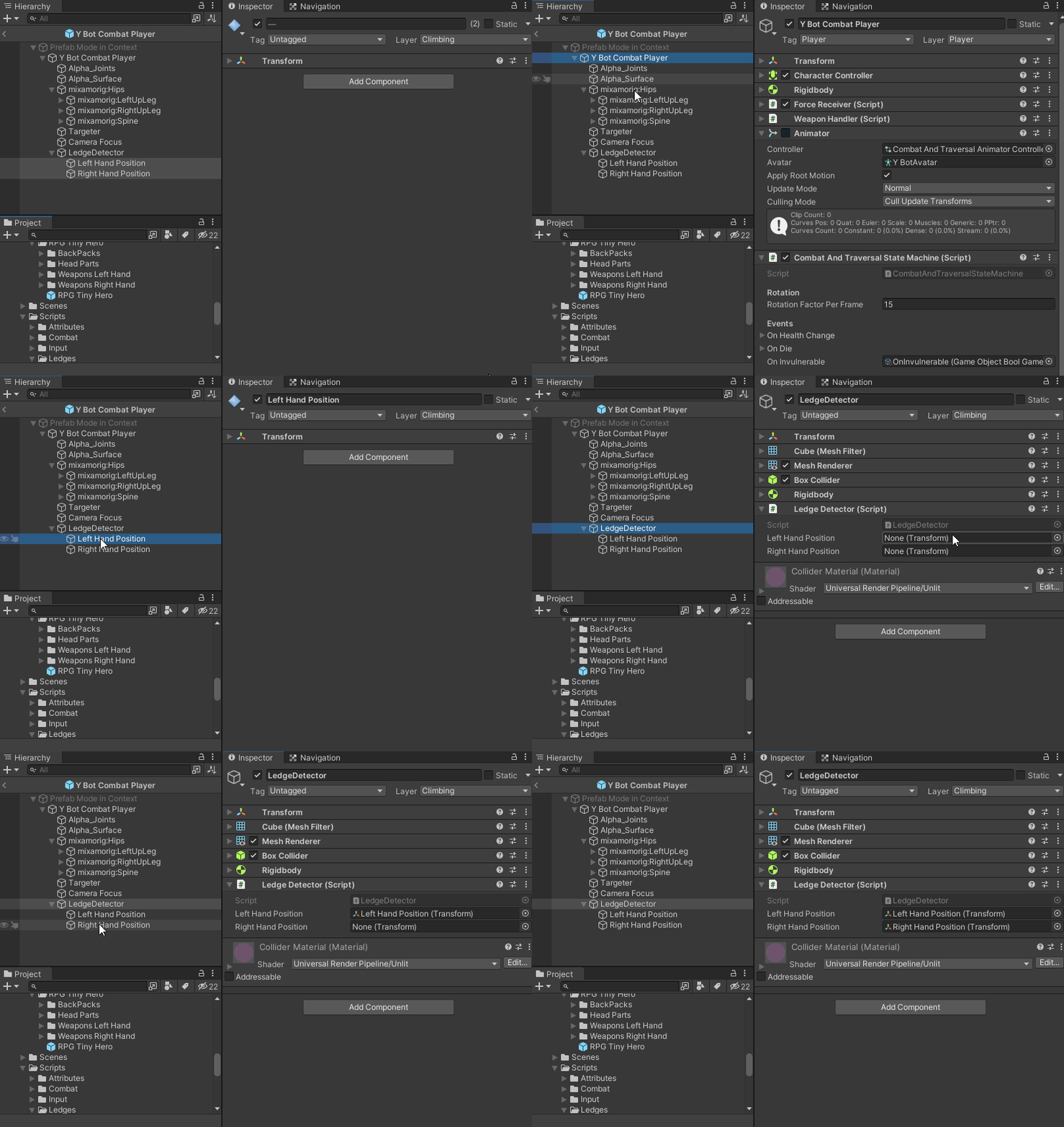 Setting the Game Objects in Unity
To get the placement to look good, place the hand position objects in front of the hands while hanging.
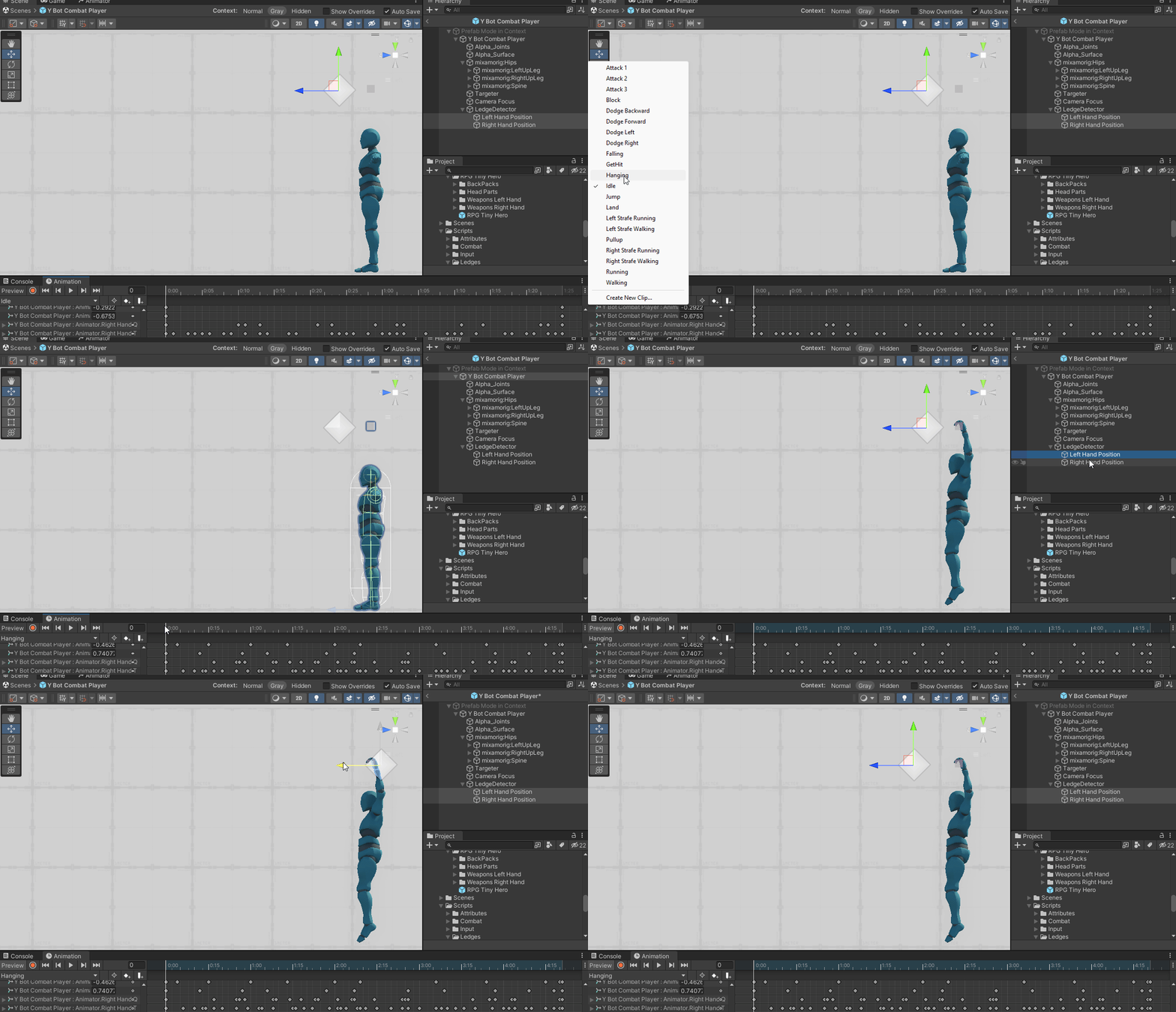
Fine Tune the placement.
Now enter play mode and go grab a ledge. Once you are hanging you can move the position of the hands to get them just right.
Conclusion
IK is a very useful tool for getting a more precise placement of hands and feet in animation. Using this system you can make sure that your character animations look good in your game.
Unity Includes a simple way to use IK out of the box. If you want a more advanced way of dealing with IK check out Unity's Animation Rigging package.

You can even use IK to create procedural animations in your game, see https://learn.unity.com/tutorial/using-animation-rigging-damped-transform# for more details.


